There is nothing more frustrating in ecommerce than watching your organic sessions graph climb for six months while your Shopify net sales stay dead flat.
Your agency sends over a monthly PDF celebrating a 40% jump in traffic. Meanwhile, you are looking at your Shopify dashboard wondering why your payouts haven't budged.
Both numbers can be true at the same time. Sessions measure how many browsers loaded a page. Revenue measures how many buyers landed on a SKU they actually wanted, trusted the offer, and made it through checkout without hitting a wall.
Here is how we tear down a Shopify store when traffic is up and orders aren't moving.
Step 1: Separate real buyer demand from traffic decoration
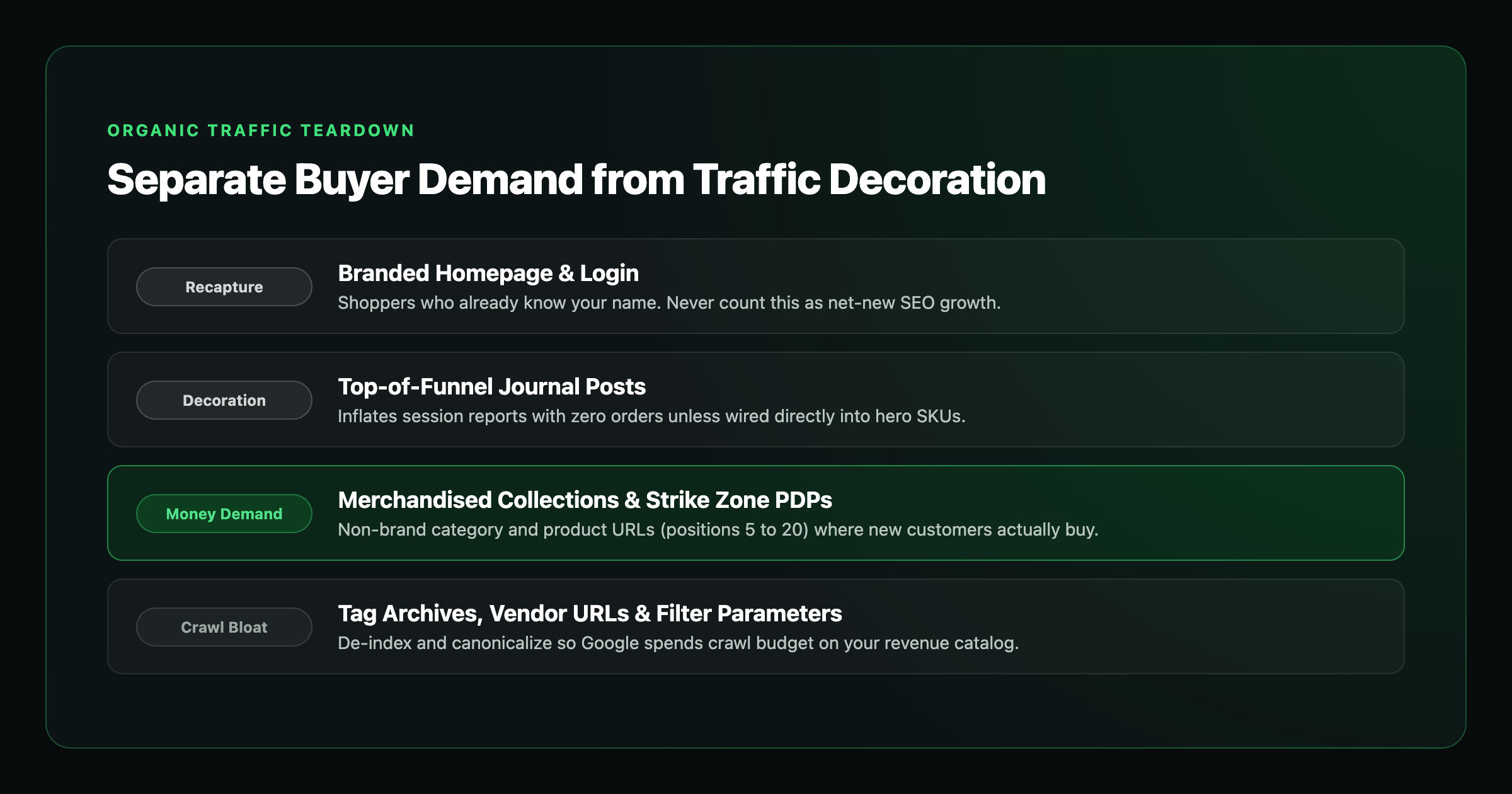
Pull your top organic landing pages from the last 90 days alongside your Search Console queries and tag every URL into one of five buckets:
| Landing page bucket | Buyer demand or decoration? | What is actually happening | What we do with it |
|---|---|---|---|
| Branded homepage | Recapture | Shoppers typing your brand name, login, or order status who already knew you existed | Keep it clean, never let an agency count it as "new SEO growth" |
| Journal / blog posts | Usually decoration | "How to" and lifestyle posts pulling informational readers from out of market | Point hard at a hero SKU with inline product cards, or stop spending budget there |
| Collection pages | High-upside demand | Category shoppers comparing options before picking a specific product | Fix above-the-fold merchandising, sort order, and mobile filters before chasing more traffic |
| Product pages (PDPs) | Direct money demand | Shoppers searching an exact SKU, material, size, or problem-solving product | Prioritize rewrites on PDPs ranking in positions 5 to 20 (your Strike Zone) |
| Facet / tag / vendor junk | Pure crawl bloat | Shopify `/collections/all/tag`, vendor archives, out-of-stock variants, and `?sort_by=` parameters | Lock down canonicals and de-index the bloat so Google crawls your real catalog |
When an agency brags about growing your traffic while your revenue stays flat, nine times out of ten all the growth is sitting in Branded and Journal rows. You didn't build a search engine for your store; you built a free digital magazine that happens to have a cart icon in the corner.
We grew DuJour's organic web traffic by 800% in nine months. For a luxury media property, session scale is the business model. For a Shopify brand, sessions only matter when they land on catalog pages that print orders.
Step 2: Fix product pages that lose the sale in 15 seconds
When a shopper types a commercial query and lands on a product page, the SEO job is finished and the merchandising job starts.
Pull up your top five organic product pages on your phone right now (not your desktop monitor) and check what sits inside the first thumb scroll:
- Does the headline and hero photo match the exact variant they searched? If they searched for a black leather weekender and the default variant loads in neon green, half of them bounce immediately.
- Is the price, shipping threshold, and delivery window visible near the Add to Cart button? Hiding shipping costs until the final checkout screen is the #1 way to manufacture cart abandonment.
- Does the sticky Add to Cart bar work cleanly on mobile?
- Are the reviews specific to that SKU? Shoppers want to see real customer photos and sizing/fit notes for the item in front of them, not a generic "great company" badge.
If your product page forces a mobile shopper to pinch, zoom, or hunt for return policies, ranking higher just burns through qualified buyers faster. It is the exact same conversion leak we see on service websites with traffic and no leads.
Step 3: Turn collection pages from warehouse dumps into guided storefronts
Collection pages are the highest-leverage SEO asset on Shopify, and most stores leave them on default settings.
A typical broken collection page has a three-paragraph block of AI-written keyword soup shoved above the product grid (pushing actual products below the fold on mobile), followed by 48 unsorted product tiles where the first three items are out of stock in popular sizes.
To make a collection page both rank and sell:
- Keep the intro headline and subcopy tight above the grid (two lines that confirm the buyer is in the right place), and place deeper buying-guide FAQs below the product grid where they help rankings without shoving products off the screen.
- Sort by bestsellers or contribution margin, never by "alphabetical" or "date added."
- Push sold-out products to the bottom automatically or hide them from collection grids.
- Add fast sub-collection pills at the top (by use case, material, size, or price band) so a category browser can narrow down to 6 relevant SKUs in one tap.
Step 4: Clean up Shopify's default index bloat and paid feed leaks
Out of the box, Shopify creates multiple URLs for every single product (`/collections/summer/products/item` vs. `/products/item`) and lets tag archives and filter URLs get crawled by Google. When Google spends its time crawling 8,000 duplicate parameter and tag URLs, your actual money SKUs sit stuck on page two.
And if you are running paid acquisition alongside organic search, those same catalog and tracking bugs will torch your ad budget. If your Merchant Center feed ships weak titles or your conversion tracking double-counts thank-you page reloads, you get Google Ads clicks that never turn into banked profit.
When we launched the paid acquisition and conversion engine for Lumini, we generated 324 qualified leads and $3.4M in pipeline in 60 days at a $12.59 CPL by obsessing over query-to-page alignment and conversion tracking from day one.
The 45-minute Shopify funnel diagnostic
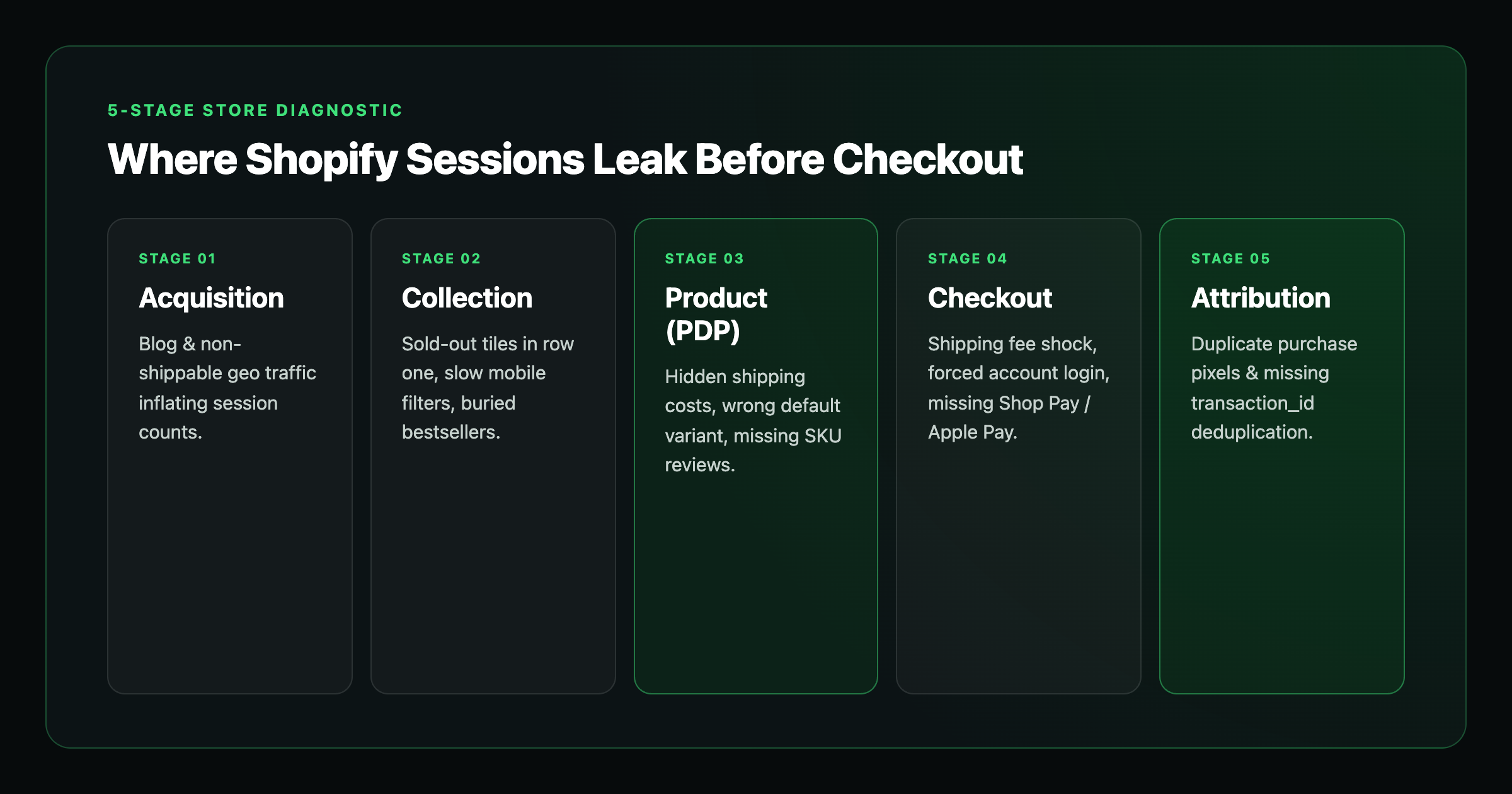
Before you rewrite a single product description or hire another content writer, walk your store through this 5-stage diagnostic in order:
| Funnel stage | What you see | What to check right now | What to fix first |
|---|---|---|---|
| 1. Acquisition | Sessions climb, add-to-cart rate drops | Search Console queries by landing page, non-shippable international traffic, and blog-vs-catalog traffic share | Strip out decoration traffic, de-index tag/facet bloat, and rewrite product and collection pages ranking in positions 5 to 20 |
| 2. Collection | High collection views, low click-through to PDPs | Mobile above-the-fold grid, default sort order, filter speed, and out-of-stock tiles in row one | Pin bestsellers to the top, push sold-out SKUs down, and add one-tap sub-collection filter pills |
| 3. Product (PDP) | Shoppers view the SKU, nobody taps Add to Cart | Variant default state, price and shipping clarity, mobile sticky ATC, and SKU-specific photo reviews | Put shipping threshold, delivery window, variant selector, and real customer proof inside the first mobile scroll |
| 4. Cart & Checkout | Healthy add-to-cart rate, steep checkout drop-off | Surprise shipping/tax spikes, forced account creation, missing Shop Pay / Apple Pay, or broken discount codes | Show free-shipping thresholds in the slide-out cart and enable one-tap express wallets |
| 5. Measurement | Orders land in Shopify, GA4 / Google Ads numbers look wrong | Reporting time-zone mismatches, duplicate Primary purchase pixels, or missing `transaction_id` deduplication | Reconcile net Shopify orders against GA4 and Google Ads for Shopify before scaling or cutting spend |
Once you isolate which row is leaking, execute these five moves in order:
- Export organic landing pages with net revenue and new-customer orders, never just sessions.
- Rewrite your Strike Zone product and collection URLs (pages already getting commercial impressions in positions 5 to 20).
- Turn high-traffic journal posts into product funnels with embedded SKU cards and direct comparison tables, or cut them from your internal link priority.
- Fix mobile merchandising on your top 10 collections before chasing new keywords.
- Audit Search Console index coverage on your top 20% revenue SKUs. If money products are excluded while tag archives are indexed, fix canonicals and sitemap hygiene first.
Want us to find the exact leak in your store?
Our ecommerce SEO programs start at $3,500/month for focused catalog and technical scopes, and integrated programs across ecommerce SEO, content, and paid Shopping/PMax typically run $5,000 to $10,000/month depending on SKU count and category competition.
Grab a free ecommerce SEO teardown or have us audit your Shopify Google Ads and Merchant Center feed. We will show you which queries actually bring buyers, which pages are leaking revenue, and the exact fixes we would ship in your first 30 days.
---
FAQ
Why is my Shopify store getting traffic but no sales?
Nine times out of ten, your traffic growth is coming from branded searches, top-of-funnel blog posts, or unmerchandised collection grids, or your product page and checkout are killing the buyer in the last 30 seconds. Sessions are a vanity count if the URLs getting the clicks are not built to take an order.
How do I know if my Shopify SEO agency is actually driving revenue?
Stop looking at total organic sessions. Open Google Search Console and Shopify Analytics side by side, strip out your own brand name, and look at net new-customer orders coming from collection and product URLs. If all the traffic growth sits on blog posts with zero assisted orders, you are paying for a magazine, not an ecommerce channel.
Should I write blog posts to grow my Shopify store?
Only after your money collections and Strike Zone product pages (positions 5 to 20) are dialed in, and only when the article is a commercial buying guide or comparison that funnels directly into a specific SKU. Writing generic lifestyle articles that never send shoppers to a cart is a waste of retainer.
Why do my Shopify collection pages get traffic without converting?
Because most Shopify themes treat a collection page like a warehouse dump. A shopper lands from a broad category search and sees 60 unranked tiles, slow mobile filters, sold-out variants in the first row, and a wall of SEO filler text shoved at the bottom. Pin your bestsellers first, hide out-of-stock SKUs, and make filtering effortless on a thumb.
Should I try to rank my homepage or my product and collection pages?
Your product and collection pages. Your homepage is for people who already know your brand name. Net-new organic revenue comes from matching a specific buyer search to the exact collection or product page that solves it.